Android Application For MTDB is dedicated to MTDB – Ultimate Movie&TV Database
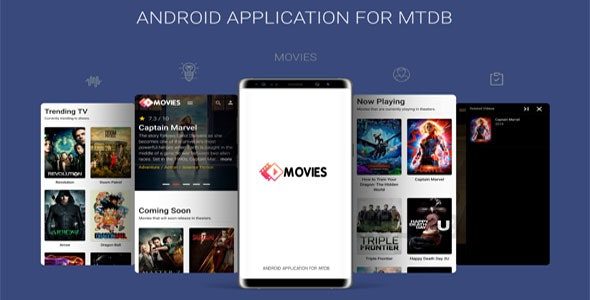
Android Application For MTDB is integrated with high end Libraries which is used for processing your MTDB Web Version through API’s and provides Awesome User Experience on Video Streaming.
Android Application For MTDB is a Native Android application which is specially designed for MTDB Website. With this Application you can get all information about movies, artists and stream videos in your Android Phone. It is quick, easy and affordable. This App has many useful built-in features and services.
This App does not require programming skills. Code is easily configurable and customizable.
Android Application For MTDB supports Video Playing with captions, Video Quality Selection, HLS Streams and support for various Video Rendering Codecs
Android Application for MTDB now supports Admob Interstitial Ads, so you can earn money from showing ads. Implementing Admob Interstitial Ads is optional and can be turn ON/OFF in Code.
Android Application For MTDB now supports Push Notification with OneSignal and Google Firebase.
Android Application For MTDB now supports Subscription feature with PayPal and Stripe Gateways. Earn money with built in premium subscription syste
How to Install/Update WordPress Theme/Plugins manually?
Step 1: Buy the Product and download the zip file.
Note: Some Zip files need to be extracted before uploading.
If you are performing an update: Just install the latest theme/plugin, and WordPress will automatically replace the older version with a newer version. All your settings and customizations will be the same as before, nothing will be changed.
Step 2: Go to “Appearance > Themes” If it’s a theme or go to the “Plugins” section if it’s a plugin through your WordPress dashboard.
Step 3: Click on “Add New” button (It’s same on themes and plugins section)
Step 4: Click on “Upload Theme” or you’ll show “Upload plugin” on plugin section
Step 5: Click on “choose file” and select the ZIP file of that theme/plugin
Step 6: Hit “Install now”
Step 7: It’ll take few seconds to Install your wordpress product
Step 8: Once It’s done, click on “Activate” and your WordPress product is Installed manually.
What are Membership plans?
With membership plans, you can access all themes and plugins for free if you are a member of our site. We have three membership plans: Monthly, Yearly, and Lifetime. You can choose according to your needs, for more info. Please visit our membership plan page.
Benefits of our Membership Plans:
- Instant access to all 6000+ premium GPL plugins and premium GPL themes, including all future releases
- Unlimited downloads
- There is no limit on downloading products
- unlimited domain usage
- Regular Updates as of when available. Usually, updates are released daily
- Cancel anytime
- Before purchasing, please read the Terms and Conditions & Refund Policy.
- If you have any questions, please first read the FAQs
- If you haven’t found the answer to your question, please get in touch with us via email or live chat, and we will respond ASAP
- Please note that any digital products on the website do not contain malicious code, viruses, or advertising. We buy the original files from the developers.
- Buy or download for FREE by subscribing to our Membership Plan. Join the membership club and enjoy complimentary access to all themes and plugins.
- More than 10000+ happy members.
- Monthly Membership Plan: ₹999.00 per month
- Yearly Membership Plan: ₹3,999.00 per year
- Lifetime Membership Plan: ₹15,999.00 one-time payment
*Visit membership plans to see offers and discounts!!
Only logged in customers who have purchased this product may leave a review.





Reviews
There are no reviews yet.