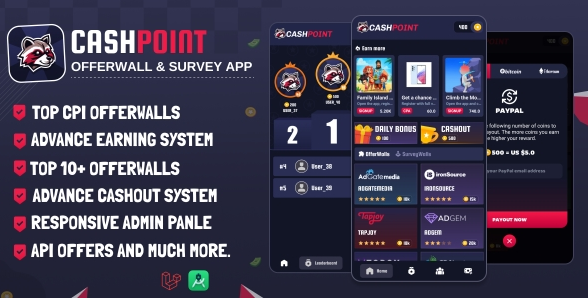
CashPoint – Is a Good Looking Offerwall Offers & Servey App That Allow Users to complete Serveys and Offers to earn money.
CashPoint Comes With Fully Responsive And Powerful Admin panel that allows you to Manage Your App from your mobile phone our computer.
CashPoint have OfferToro API Offers in that you can add offer banner images and offer Ratings.
✔️App Features
- Clean And Unique UI
- Top Offers
- Daily Bonus
- In progress
- SDK Offers
- Survays
- API Offers
- Refferal System
- Payout System
- PayPal
- Bitcoin
- Ethereum
- Android 13 Supported
✔️Admin Panel Features
- Build With Laravel
- Dashboard
- Api Offers
- Redeem Requests
- User Activity
- Settings
- Account Setting
- Set Refer Bonus
- Set Daily Bonus
- Set Refer Points
- PayPal Redeem Setting
- BTC Redeem Setting
- ETH Redeem Setting
- OfferWall Postbacks
✔️Offerwalls
- AdGem Offerwall
- ironSource Offerwall
- TapJoy Offerwall
- AdGetMedia Offerwall
- OfferToro Offerwall
- CPA Lead Offerwall
✔️Survay Wall
- CPX Research Survay Wall
- Bitlab Survay Wall
- Pollfish Offerwall
Requirements
- Android Studio Giraffe | 2022.3.1 Patch 4.
- PHP version 8.2 supported.
What you get:
- Source Code
- Admin Panel
- Documentation
Note:-
1. Offerwalls Approval Needed
app and website both are diffrent.
How to Install/Update WordPress Theme/Plugins manually?
Step 1: Buy the Product and download the zip file.
Note: Some Zip files need to be extracted before uploading.
If you are performing an update: Just install the latest theme/plugin, and WordPress will automatically replace the older version with a newer version. All your settings and customizations will be the same as before, nothing will be changed.
Step 2: Go to “Appearance > Themes” If it’s a theme or go to the “Plugins” section if it’s a plugin through your WordPress dashboard.
Step 3: Click on “Add New” button (It’s same on themes and plugins section)
Step 4: Click on “Upload Theme” or you’ll show “Upload plugin” on plugin section
Step 5: Click on “choose file” and select the ZIP file of that theme/plugin
Step 6: Hit “Install now”
Step 7: It’ll take few seconds to Install your wordpress product
Step 8: Once It’s done, click on “Activate” and your WordPress product is Installed manually.
What are Membership plans?
With membership plans, you can access all themes and plugins for free if you are a member of our site. We have three membership plans: Monthly, Yearly, and Lifetime. You can choose according to your needs, for more info. Please visit our membership plan page.
Benefits of our Membership Plans:
- Instant access to all 6000+ premium GPL plugins and premium GPL themes, including all future releases
- Unlimited downloads
- There is no limit on downloading products
- unlimited domain usage
- Regular Updates as of when available. Usually, updates are released daily
- Cancel anytime
- Before purchasing, please read the Terms and Conditions & Refund Policy.
- If you have any questions, please first read the FAQs
- If you haven’t found the answer to your question, please get in touch with us via email or live chat, and we will respond ASAP
- Please note that any digital products on the website do not contain malicious code, viruses, or advertising. We buy the original files from the developers.
- Buy or download for FREE by subscribing to our Membership Plan. Join the membership club and enjoy complimentary access to all themes and plugins.
- More than 10000+ happy members.
- Monthly Membership Plan: ₹999.00 per month
- Yearly Membership Plan: ₹3,999.00 per year
- Lifetime Membership Plan: ₹15,999.00 one-time payment
*Visit membership plans to see offers and discounts!!
Only logged in customers who have purchased this product may leave a review.






Reviews
There are no reviews yet.